 PlayCC

PS5 Xbox
Play on your TV.
Read in Thai.
PlayCC reads English game subtitles over Remote Play and shows the Thai translation on your TV as you play.
Subtitle translation exampleWe’re almost at the station. เราเกือบถึงสถานีแล้ว
One line, from game to TV
Use the gear you already have.
 We’re almost at the station.
The game displays English
PS5 / Xbox
Enable English subtitles in the game and connect over Remote Play.
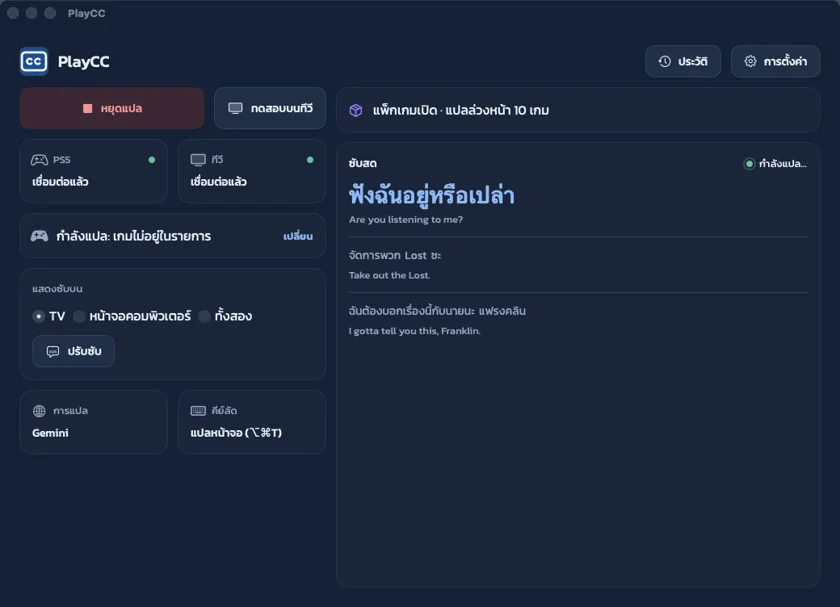
PlayCC reads and translates
Android / iPhone / iPad / Windows / Mac
The app on your phone or computer reads the English line from the game picture.
- เราเกือบถึงสถานีแล้ว
Thai appears on your TV
Android TV / Google TV / LG / Samsung
Read the subtitle over the game, or in the app if you play on a monitor.
Keep a guide beside the screen
All game guidesStart playing free
View all plansPlus
Pro
Your keys and PSN details stay on your device
- You can use PlayCC without creating an account
- The game picture comes from your PS5 on your home network
- You sign in to PSN directly with Sony. PlayCC never sees or stores your PSN password
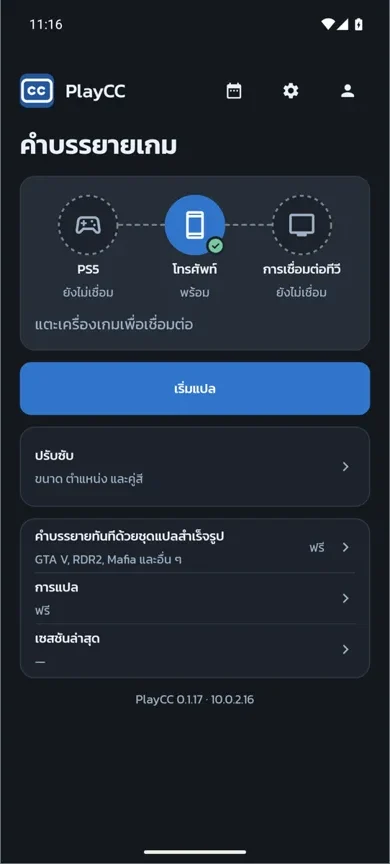
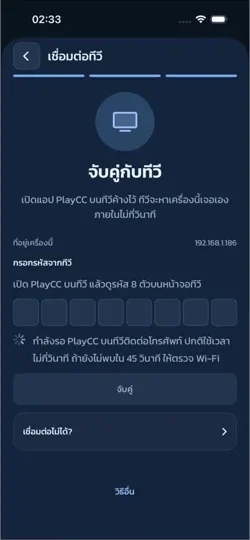
Download PlayCC
For Mac
macOS 13 or later · Apple Silicon and Intel
Translate console subtitles from your Mac. Unzip and move PlayCC to Applications. Free translation needs macOS 26 or later.
Download MacDownload PlayCC
For Windows
Windows 10 or 11 · 64-bit
Translate console subtitles from your PC. Extract the folder, then run PlayCC.exe inside it.
Download WindowsDownload PlayCC
For Android
Android 8 or later · phone
Translate console subtitles from your phone. Install it from the Google Play test: 3 steps on the download page.
Download AndroidDownload PlayCC
For iPhone / iPad
iOS or iPadOS 16 or later · from the App Store
Translate console subtitles on your iPhone or iPad. The App Store installs it and keeps it up to date. Free translation needs iOS 26 or later.
Download iPhone / iPad