 PlayCC
Console
A PS5 or Xbox that can turn on Remote Play.
From game picture to subtitle
PlayCC reads English subtitles from PS5 and Xbox games over Remote Play and translates them into Thai on your TV or phone as you play. This page covers how it works, who it is for, and what you need before you start.
We’re almost at the station.
เราเกือบถึงสถานีแล้ว
Most PS5 and Xbox games ship with English subtitles only. PlayCC reads those subtitles from the game picture over Remote Play and translates them into Thai right away, so you can play new releases without waiting for official Thai subtitles.
Choose whether Thai subtitles overlay the game on your TV, or read them in the PlayCC app on your phone or computer when you play on a monitor. You can also translate menus and item descriptions in place whenever you need to.
Use the gear you already have.
 We’re almost at the station.
PS5 / Xbox
Enable English subtitles in the game and connect over Remote Play.
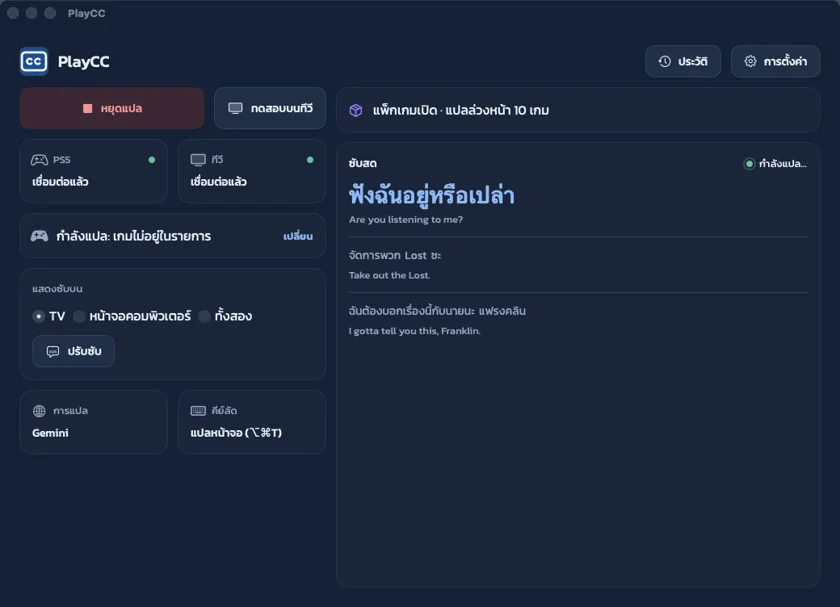
Android / iPhone / iPad / Windows / Mac
The app reads the Remote Play picture and translates with your AI key, offline M2M100, or the game’s translation pack.
เราเกือบถึงสถานีแล้วAndroid TV / Google TV / LG / Samsung
Read the subtitle over the game, or in the app if you play on a monitor.
On PS5, the second PSN account receives the picture while you keep playing on your main account.
No waiting for official Thai subtitles on big titles like GTA VI.
Follow the whole story even when the English dialogue moves quickly.
Subtitles on the big screen let friends and family read along at once.
A PS5 or Xbox that can turn on Remote Play.
A second, free PSN account to receive the game picture; your main account still plays as usual — PS5 only.
A phone or computer to run the PlayCC translator app, on Android, iPhone or iPad, Windows or Mac.
A supported TV if you want subtitles on the TV, or read them in the app on a monitor.
Every device on the same Wi-Fi or wired network.
Want the step-by-step install? See the setup guide
The subtitles shown on the TV and in the app are in Thai, translated from the English subtitles in the game. The app and website are Thai-first with English available.
No. PlayCC works without a PlayCC account. You sign in to PSN or Xbox on Sony's or Microsoft's own page, not through our servers.
Your game screen is never uploaded. Reading and translation happen on your device, and your keys and account details stay on your device. Read the privacy policy for details.
Any PS5 or Xbox game that shows English subtitles on screen. Popular titles like GTA VI have a translation pack, and for other games you can choose “Game not in the list” to translate live.
You can start for free and save one screen-area template. See Plans for current features and prices.
There is a small delay from reading and translating. Wired Ethernet or 5 GHz Wi-Fi near the router is smoothest, and the game you play with your controller stays as responsive as usual.
PlayCC works without a PlayCC account. The game picture comes from your PS5 on your home network.